Federal Bill C-32, Fall Economic Statement Implementation Act, 2022Bill C-32 received royal assent on December 15, 2022, introducing new tax return filing and information reporting requirements for trusts. Previously, a trust that had no activity during the year and no income tax payable was not required to file a T3 return. However, for taxation years after December 30, 2023, certain trusts, including bare trusts that were not required to file a T3 return under the old rules, will now be required to do so. In addition, the new reporting rules will require all non-resident trusts that currently have to file a T3 return, express trusts that are resident in Canada (with some exceptions), and bare trust arrangements to report additional information on the stakeholders of the trust. A trust will be subject to a new penalty if it fails to comply with the new disclosure rules. The penalty is the greater of $2,500 or 5% of the maximum FMV of the property held by the trust in the taxation year. The Québec government announced that it would harmonize with the new federal requirements for trusts effective as of the same date. DT Max T3If keyword TRUST = Testamentary and keyword TRUST-TYPE is not a Graduated rate estate or Qualified disability trust Or If keyword TRUST = Inter vivos trust and keyword TRUST-TYPE is not one of the following:
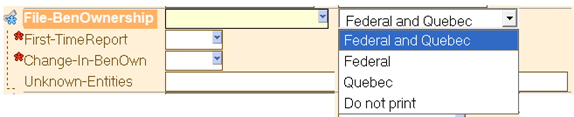
then a warning message will be generated if the keyword FILE-BENOWNERSHIP has not been entered. If a client would like to provide the additional information regardless of the type of trust, the user should simply enter the same keyword FILE-BENOWNERSHIP. The only difference is that they will not be prompted by a warning message to enter the keyword. Step 1 – Enter applicable information in keyword group FILE-BENOWNERSHIP
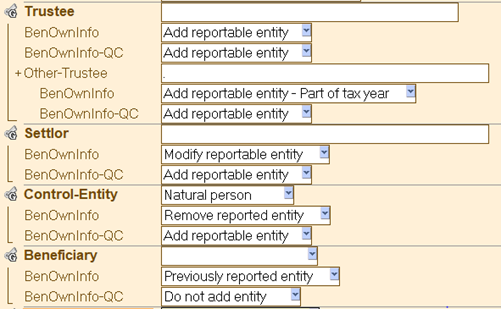
The keyword FILE-BENOWNERSHIP must be entered to indicate the jurisdiction to which the stakeholder information should be reported to. Based on the jurisdiction, DT Max T3 will automatically generate the applicable keywords in the affected groups: Trustee, Settlor, Beneficiary and Control-Entity. Step 2 – Enter the keyword BENOWNINFO and BENOWNINFO-QC, if applicable, for every beneficial owner. If this is the first time the trust is reporting the entities, or the first time being entered in DT Max T3, the user must indicate what information is to be reported for each entity and for each jurisdiction. As the reporting rules differ between the CRA and RQ, the user must enter the information with two distinct keywords.
For the information to be captured on the respective forms, the following keywords must be entered if the entity group applies:
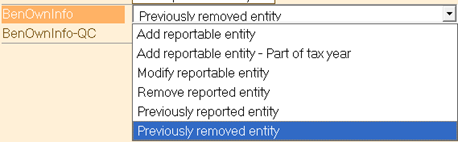
The options available for the keywords BENOWNINFO are:
Schedule 15 must be filed annually with the trust's return. However, previously reported entities will be carried forward by the CRA and thus not required to be re-entered unless there is a modification. DT Max T3 will carry forward this keyword with the option that the entity has been previously reported or removed, as the case may be. The options available for the keywords BENOWNINFO-QC are:
Unlike the CRA, RQ requires that the entities be reported yearly. These keywords will be carried forward with the same option from year to year. It is important to verify all these keywords on an annual basis to be sure the information is correct for the applicable tax year. Step 3 – Enter the applicable information for each entity. Within each stakeholder group, Trustee, Settlor, Control-Entity, Beneficiary, the trust must report the entity classification, name, address, date of birth (in the case of an individual), country of residence and the taxpayer's identification number.
Step 4 – Verify all "Error and warning messages". |