 How to file the T3 slip and T3 Summary ▲
Electronic filing methods
The threshold for mandatory electronic filing of trustrelated information returns (T3 slips) for a calendar year has been lowered from 50 to 5 for information returns filed after December 31, 2023.
Filing by Web Forms
Our Web Forms application is free and secure. To use it, all you need is access to the Internet. With Web Forms you can complete a trust-related information return easily, following the step-by-step instructions.
Web Forms lets you:
-
file up to 100 slips (original, additional, amended, or cancelled) from our website
-
calculate all of the totals for the T3 Summary
-
create a digital trust-related information return containing T3 slips and T3 Summary, which can be saved and imported at a later date
-
print all your slips and your summary
-
validate data in real time
After you submit your trust-related information return, you will receive a confirmation number that will be your proof that the CRA received it.
To use the Web Forms application, you must have a web access code. If you do not have a web access code, you can easily get one online or by calling us. For more information, see "Web access code" on page 70.
To start using this application or to get more information about Web Forms, go to canada.ca/taxes-iref.
Filing by Internet file transfer
Internet file transfer allows you to transmit an original or amended T3 summary and slips with a maximum file size of 150 MB. All you need is a web browser to connect to the Internet, and your software will create, print, and save your digital trust-related information return in XML format. For information about this filing method, contact your software publisher or go to canada.ca/taxes-iref.
Web access code
To file your T3 summary and slips over the Internet using the Internet file transfer or Web Forms service, you will need a web access code (WAC). If you have misplaced or do not have a WAC, go to canada.ca/taxes-iref to access our web access code online service. If you cannot get your WAC online or would like to change it, call the Business Enquiries line at 1-800-959-5525.
Filing on paper
If you file 1 to 5 slips, we strongly encourage you to file over the Internet using Internet file transfer or Web Forms. However, you can still file up to 5 slips on paper for returns filed after December 31, 2023.
If you need more paper copies, you can order a maximum of 9 single-page slips at canada.ca/cra-forms or by calling 1-800-959-5525.
If you choose to file your return on paper, mail it to the following address:
Jonquière Taxation Centre
T3 Program
PO Box LCD 1300
Jonquière QC G7S 0L5
Complete one copy of the T3 slip for each recipient and send them with your T3 Summary. Enter the information for two different recipients on one sheet. This will let us process your information return faster. You must keep a copy of the T3 slips and the T3 Summary for your files.
Filing using computer-printed (customized) forms
For those who fill out a large number of T3 slips, we accept certain slips other than our own. For help on how to fill out the slips accurately, consult the guidelines for the production of customized forms at canada.ca/cra-customized-forms or see the current version of Information Circular IC97-2R, Customized Forms.
If you are a mutual fund trust that files T3 slips by Internet, you can combine the income and capital gains from several funds onto one T3 slip for each unit holder. However, when you combine the slips, you have to do all of the following:
-
submit a sample of the combined information slip requesting an approval number
Notes
Send your digital submission in either *.pdf or *.jpg format to customized-hors-series@cra.gc.caSend your paper submission to the following address:
Individual Returns Directorate
Information Returns Filers Services Section
750 Heron Road, 7th floor
Ottawa ON K1A 0L5
-
prepare the Internet submission of summary forms and slips, which you submit to us at the individual fund level
-
write "Combined information slip" clearly on the T3 slip under the recipient name and address, and provide the unit holders with statements that allow them to reconcile the amounts reported on the combined information slips
-
maintain an audit trail so the combined information slips can be verified if we audit these funds later
Distributing the T3 slip ▲
Send us the T3 slip along with the T3 Summary no later than 90 days after the end of the trust's tax year end. See "Tax year-end and fiscal period" on page 21.
Do not staple the summary and slips to the T3 return.
Send two copies of the T3 slip to the beneficiary. You do not have to keep a copy of the T3 slips. However, when you file online, you have to keep the information from which you prepared the slips in an accessible and readable format.
You can provide recipients with a digital copy of their T3 slips only if the recipient gives you their consent in writing or by email.
If you fail to distribute the T3 slip or any other trust-related information slip to a recipient by the due date, you will be liable for a penalty. For more information, see "Penalties and interest" on page 23.
Amending, cancelling, adding, or replacing T3 slips
After filing your T3 slips, you may notice an error on a trust-related slip. If so, you will have to prepare an amended slip to correct the information. Provide copies to the recipient. Do not include slips that have no changes.
If you prepare and issue an amended T3 slip after you have filed the original slip with us, you may have to file an amended T3 Summary. If there is a change to the amounts in the boxes shown on the front of the summary, file an amended T3 Summary. If the amended T3 slip affects the amounts shown on the T3 Trust Income Tax and information Return, or on Schedule 9, Income Allocations and Designations to Beneficiaries, do not file another T3 return. Instead, send us a completed Form T3-ADJ, T3 Adjustment Request, or a letter providing the details of the change. Indicate the tax year you want us to change and send us any supporting documents. Include the trust's account number on the letter.
Amending or cancelling T3 slips over the Internet
To amend a T3 slip over the Internet, change only the information that is incorrect and retain all of the remaining information that was originally submitted. Use summary report type code "A" and slip report type code "A."
To cancel a slip, do not change any information that was contained on the original slip. Use summary report type code "A" and slip report type code "C."
For more information about amending or cancelling trust-related information slips using the Internet, go to canada.ca/taxes-iref.
Amending or cancelling T3 slips on paper
If you choose to file your amended return on paper, clearly identify the T3 slips as amended or cancelled by writing "AMENDED" or "CANCELLED" at the top of each slip. Make sure you fill in all the necessary boxes, including the information that was correct on the original slip. Send two copies of the slips to the recipient. Send one copy of the amended/cancelled slips to us with a letter explaining the reason for the amendment/cancellation.
Note
If you notice errors on the trust-related slips before you
file them with us, you can correct them by preparing
new information slips and removing any incorrect
copies from the return. If you do not prepare a new slip,
initial any changes you make on the slip. Be sure to also
correct the T3 Summary.
Adding T3 slips
After you file your T3 return, you may discover that you need to send us additional T3 slips. If you have original T3 slips that were not filed with your return, file them separately either online or on paper.
To file additional slips online, see "Electronic filing methods" on page 69.
If you file additional slips on paper, clearly identify the new slips by writing "ADDITIONAL" at the top of each slip. Send one copy of the additional slips to any tax centre. See "Electronic filing methods" on page 69 for more information on adding slips over the Internet or go to canada.ca/taxes-iref.
Notes
If the total number of trust-related slips (including any additional slips) you file is more than 5 for the same calendar year, you have to file the additional slips over the Internet.
Any additional trust-related slips that are filed after the due date may result in a penalty. For more information, see "Failure to distribute/file trust-related information slip as required" on page 24.
Recipient identification number ▲
The recipient identification number is one of the following:
-
the social insurance number (SIN) if the beneficiary is an individual (other than a trust)
-
the business number and program account if the beneficiary is a corporation or a partnership
-
the trust account number if the beneficiary is a trust
This section explains the special rules and penalties that apply to using SIN, business number and program account and the trust account number.
Trustee - Anyone who prepares an information slip has to make a reasonable effort to get the SIN, business number and program account, or trust account number from the person or partnership who will receive the slip. Unless you make a reasonable effort to get this information, you will be liable to a $100 penalty each time you do not provide the SIN, business number and program account, or trust account number on the information slip. This penalty does not apply if the person or partnership has applied for but has not yet received a SIN, a business number and program account, or trust account number when they file their return.
Beneficiary - Persons or partnerships have to give their SIN, business number and program account, or trust account number on request to anyone who has to prepare an information slip for them.
If the person or partnership does not have a SIN, business number and program account, or trust account number, both of the following rules apply:
-
the person or partnership must apply for the number within 15 days of your request (the SIN from any Service Canada Centre, the business number and program account and trust account number from CRA)
-
once the person or partnership receives the number, they have 15 days to give it to you
Persons or partnerships who, for any reason, do not comply with these requirements are liable to a penalty of $100 for each failure to give their SIN, business number and program account, or trust account number.
A beneficiary may have applied for but has not yet received a SIN, a business number and program account, or a trust account number, or the beneficiary may refuse to give you the number. In these cases, do not delay filling out the information slip beyond the filing due date. Depending on the type of beneficiary, if you have not received the SIN, business number and program account, or trust account number by the time you prepare the T3 slip, enter the following in box 12:
-
beneficiary is an individual (other than a trust)
Enter 000000000
-
beneficiary is a business (sole proprietor, corporation or partnership)
Enter 000000000RP0000
-
beneficiary is a trust
Enter T00000000
If you have to prepare an information slip, you, your employees, your officers, or your agents cannot knowingly use, share, or allow a SIN, business number and program account or trust account number to be shared without the person's or partnership's written consent, unless required or authorized by law. Any person who does so is guilty of an offence and, if convicted, may have to pay a fine or go to jail, or both.
For more information, see Information Circular IC82-2R, Social Insurance Number Legislation That Relates to the Preparation of Information Slips.
How to complete the T3 slip ▲
Type or print the information on the slip. Report all amounts in Canadian dollars. If an amount was paid in foreign funds at various times throughout the year, to get the applicable rate, go to bankofcanada.ca/rates/exchange or call 1-800-959-8281.
If there is a preferred beneficiary election and other income is also allocated to the same beneficiary, complete one T3 slip for the elected income and a separate slip for all other allocated income.
You can get the information needed to complete boxes 21 to 51 from Schedule 9, Income Allocations and Designations to Beneficiaries.
Recipient's name and address - Enter the information in the white area provided. If the payment is to an individual, enter the beneficiary's name. If the payment is to a joint beneficiary, enter both names. If the payment is made to a trust, enter the name of the trust and not the names of the individual beneficiaries of that trust. If the payment is made to an association, organization, or institution, enter that name. Following the beneficiary's name, enter the beneficiary's full address including city and province or territory. Also include the postal code.
Year - Enter the applicable tax year at the top of the slip.
Trust year-end - Use a four-digit number to indicate the year, and a two-digit number to indicate the month of the trust's tax year-end.
Note
For your convenience, we have put the instructions for
the following boxes in numeric order, even though the
order on the slip may be different. The high-use boxes
appear first, followed by the generic boxes.
Box 12 - Recipient identification number ▲
If the beneficiary is an individual (other than a trust), enter the individual's social insurance number.
If the beneficiary is a business (sole proprietor, corporation or partnership), enter the 15 character program account number of the business.
If the beneficiary is a trust, enter the trust account number.
Note
If you do not have the number, see the section titled
"Recipient identification number" on page 71. Do not
leave this box blank.
Box 14 - Account number
You have to enter the trust's account number, if we have assigned one. Do not leave this box blank. For security purposes, do not include the trust account number on the copies you provide to the beneficiary.
1 alpha, 8 numeric:
-
T3 slip, box 14, example: T 00000000
-
trust account number assigned by the CRA
-
must correspond to the "Trust account number" on the related T3 Summary record
-
if you have not been assigned such a number, enter
T00000000 in the field
Box 16 - Report code ▲
Enter one of the following codes:
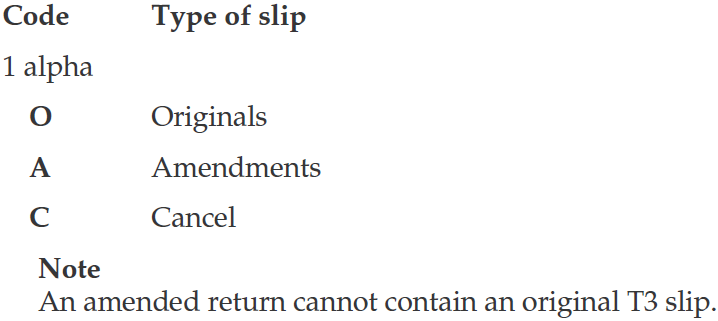
If you use code A or C, see "Amending, cancelling, adding, or replacing T3 slips" on page 70 for more information.
Box 18 - Beneficiary code ▲
You have to enter one of the following codes to identify the type of beneficiary (do not leave this box blank):

Box 21 - Capital gains
Enter the result of the beneficiary's share of the amount from line 921 of Schedule 9, multiplied by 2.
Note
If box 21 includes capital gains from foreign property,
enter an asterisk (*) beside the amount in box 21. In the
footnote area, identify each country, enter "non-business
income for foreign tax credit" and the taxable portion of
the amount included in box 21 that relates to the
disposition of foreign property.
For more information, see "Line 921 - Taxable capital gains" on page 57.
Box 23 - Actual amount of dividends other than eligible dividends ▲
Enter the beneficiary's share of the amount from line 923 of Schedule 9.
If the beneficiary is an individual or a trust (other than a registered charity), see box 32 and box 39 for more instructions.
Box 26 - Other income ▲
Enter the beneficiary's share of the amount from line 926 of Schedule 9. Include amounts such as the following in this box:
-
death benefits
-
retiring allowances
-
pension income other than lump-sum pension benefits already included in box 22
-
net rental income
-
net business, farming, and fishing income
-
interest income
Notes
Enter an asterisk (*) beside the amount in box 26 if it includes business, farming, or fishing income from a communal organization. In the footnote area, enter "self-employment earnings for CPP purposes," and indicate the type of income- business, farming, or fishing- and the amount of the beneficiary's share.Enter an asterisk (*) beside the amount in box 26 if it includes any net rental income from real or immovable rental property transferred to the trust. In the footnote area, enter "Net rental income" included in "earned income" - ITA 75(2), and indicate the amount of the beneficiary's share.
No other footnotes are required for box 26.
Box 30 - Capital gains eligible for deduction
Only personal trusts complete box 30.
Enter the result of the beneficiary's share of the amount from line 930 of Schedule 9, multiplied by 2.
Where the trust has realized in its tax year both taxable capital gains which are eligible for a beneficiary's capital gains deduction, and taxable capital gains that are not eligible, very generally, the rules ensure that a proportionate share of each of the eligible taxable capital gain, and the non-eligible taxable capital gain is allocated and designated to each beneficiary. Subsection 104(21.2) provides the formulas to determine the amount of eligible taxable capital gains to designate in respect of QFFP and QSBCS. Very generally, the effect of each of these formulas is that the amount designated to a particular beneficiary is equal to the beneficiary's proportionate share of all the trust's subsection 104(21) designations for the year to its beneficiaries in respect of its net taxable capital gains for the year, to the extent that the amount so calculated represents eligible taxable capital gains of the trust for the year from the disposition of QFFP or QSBCS (depending on which formula is being applied).
Note
Enter an asterisk (*) beside the amount in box 30. In the footnote area, enter either "qualified farm or fishing property," or "qualified small business corporation shares," whichever applies and the tax year(s) in which the trust disposed of the property.
This amount relates to the disposition of qualified small business corporation shares (QSBCS) and/or qualified farm or fishing property (QFFP) by the trust in the current year, or from a capital gains reserve claimed by the trust in a prior year.
Where the amount in box 30 includes an amount that relates to a capital gain reserve claimed in the trust's prior tax year and which is brought into the trust's income in the current year, you must also include the following in the footnote area:
-
the amount in box 30 that relates to the trust's capital gain reserve being included in the trust's income
-
the tax year in which the trust disposed of the relevant capital property.
Where the amount reported in box 30 relates to more than one disposition of QSBCS or QFFP by the trust in the current or prior tax years, provide the above details for each property and year of disposition in the Footnotes.
For more information, see "Line 930 - Taxable capital gains eligible for deduction" on page 58.
Box 32 - Taxable amount of dividends other than eligible dividends ▲
If the beneficiary is an individual or a trust (other than a registered charity), enter the result of the amount of dividends other than eligible dividends from taxable Canadian corporations reported in box 23, multiplied by 1.15.
Do not include negative amounts when completing box 32 of the T3 slip.
Box 39 - Dividend tax credit for dividends other than eligible dividends ▲
If the beneficiary is an individual or a trust (other than a registered charity), enter 9.0301% of the amount in box 32.
Box 49 - Actual amount of eligible dividends ▲
Enter the beneficiary's share of the amount from line 949 of Schedule 9.
Box 50 - Taxable amount of eligible dividends ▲
If the beneficiary is an individual or a trust (other than a registered charity), enter the result of the amount of eligible dividends from taxable Canadian corporations reported in box 49, multiplied by 1.38.
Box 51 - Dividend tax credit for eligible dividends ▲
If the beneficiary is an individual or a trust (other than a registered charity), enter 15.0198% of the amount in box 50.
Other information area
This area on the T3 slip has boxes for you to enter codes and amounts for less common amounts, such as foreign business income, eligible death benefits, investment tax credits, and others.
The boxes are not pre-numbered as in the top part of the slip. Therefore, enter the codes that apply to the beneficiary.
If more than six codes apply to the same beneficiary, use an additional T3 slip. Do not repeat all the data on the additional slip. Enter only the beneficiary's identification number and name, as well as the trust's name and account number, and complete the required boxes in the "Other information" area.
Although the CRA's position at this time is that we will not require the breakdown by country on the T3 slip, nor require the filing of multiple T3 slips, it is your obligation and responsibility to provide us with such information on request. Your records have to provide enough details to identify each foreign country and the amount of business income, in Canadian dollars, from each country.
Box 22 - Lump-sum pension income ▲
Enter the beneficiary spouse's or common-law partner's share of the amount from line 922 of Schedule 9.
Box 24 - Foreign business income
Enter the beneficiary's share of the amount from line 924 of Schedule 9 (before withholding taxes).
Box 25 - Foreign non-business income
Enter the beneficiary's share of the amount from line 925 of Schedule 9 (before withholding taxes).
Box 31 - Qualifying pension income ▲
Enter the beneficiary spouse's or common-law partner's share of the amount from line 931 of Schedule 9. This amount is included in box 26.
Box 33 - Foreign business income tax paid
Enter the beneficiary's share of the amount from line 933 of Schedule 9.
Box 34 - Foreign non-business income tax paid
Enter the beneficiary's share of the amount from line 934 of Schedule 9.
Box 35 - Eligible death benefits ▲
Enter the beneficiary's share of the amount from line 935 of Schedule 9. This amount is included in box 26.
For more information, see "Line 935 - Eligible death benefits" on page 58.
Box 37 - Insurance segregated fund net capital losses
Enter the result of the beneficiary's share of the amount from line 937 of Schedule 9, multiplied by 2.
Box 38 - Part XII.2 tax credit
Enter the beneficiary's share of the amount from line 938 of Schedule 9.
For more information, see "Schedule 10 - Part XII.2 Tax and Part XIII Non-Resident Withholding Tax" on page 59.
Boxes 40, 41 and 43 - Investment tax credit
Effective for 2016 and subsequent years, only a graduated rate estate or a communal organization that is deemed to be an inter vivos trust can complete boxes 40, 41 and 43.
For each type of property or expenditure made by the trust in the year that is eligible for the investment tax credits (ITC), prepare a separate T3 slip for each designation to beneficiaries.
Box 40 - Investment cost or expenditures for investment tax credit
Enter the beneficiary's share of the amount from line 940 of Schedule 9.
Box 41 - Investment tax credit
Enter the beneficiary's share of the amount from line 941 of Schedule 9.
For more information, see "Lines 940 and 941 - Investment tax credit (ITC)" on page 59.
Box 42 - Amount resulting in cost base adjustment
Enter the beneficiary's share of the amount from line 942 of Schedule 9. If this is a negative amount, put it in brackets.
Note
Enter an asterisk (*) beside any amount entered in
box 42. In the footnote area, indicate whether the amount
should be added to the adjusted cost base (ACB) of the
property (for a negative amount), or subtracted from
the ACB (for a positive amount).
Do not include new units issued to a beneficiary in satisfaction of a distribution of income. Instead, advise the beneficiary that you have issued these units, as well as the number of units and their value.
Box 43 - Investment tax credit - Code number
Enter the applicable investment tax credit code number (4B, 12, 6 or 7) and provide a statement to each beneficiary with the following description, as applicable, of the code number:
-
Code 4B - Qualified expenditures for scientific research and experimental development (SR&ED):
-
Enter the Box 40 amount on line 67120 of Form T2038(IND), Investment Tax Credit (Individuals).
-
-
Code 12 - Qualified property, or qualified resource property acquired after 2013 and before 2017 that is eligible for the transitional relief rate:
-
Enter the Box 40 amount on line 67140 of Form T2038(IND).
-
For more information, go to canada.ca/atlantic-investment-tax-credit.
-
Code 12 - Qualified resource property acquired in 2015 that is not eligible for the transitional relief rate:
-
Enter the Box 40 amount on line 6723 of the 2015 version of Form T2038(IND) and file it with your 2016 return.
-
-
Code 6 - Apprenticeship job creation tax credit:
-
Enter the Box 40 amount on the appropriate line of Part B of Form T2038(IND).
-
Box 45 - Other credits
Research and development tax credit
Enter the beneficiary's share of the amount from line 945 of Schedule 9.
Note
Enter an asterisk (*) beside the amount in box 45. In the
footnote area, enter "Newfoundland and Labrador
R&D" or "Yukon R&D," whichever applies, and the
amount of this credit from box 45.
Box 46 - Pension income qualifying for an eligible annuity for a minor ▲
Enter the beneficiary's share of the pension income that is eligible for a transfer to an eligible annuity for certain minors, from line 946 of Schedule 9 (also included in box 26).
Box 47 - Retiring allowance qualifying for transfer to an RPP or RRSP
Enter the beneficiary's share of the retiring allowance, which qualifies for a transfer to a registered pension plan or registered retirement savings plan, from line 947 of Schedule 9 (also included in box 26).
Box 48 - Eligible amount of charitable donations
Enter the beneficiary's share of the charitable donations or gifts of a communal organization, from line 948 of Schedule 9. For more information, see Information Circular IC78-5R, Communal Organizations.

|

|

|